
Sound

🎮 Plus the Secret Knob

Module Goal: give your robot ears. This sensor listens for loud sounds and it has a secret knob on board that YOU can tune. By the end, your robot will obey your hands.
Goal:
read the raw sound signal AND discover the sensitivity knob on the module's back.
Concepts:
Digital Input · Threshold · Hardware Tuning
import machine  # Library that controls the board's pins
import time  # Library for pauses

# Sets up pin26 as an input for the sound sensor
# pin26 corresponds to D2 on the Sensor Shield V5.0
pin26 = machine.Pin(26, machine.Pin.IN)

while True:  # Repeat forever
    state = pin26.value()  # Read the raw sound signal
    print("Sound signal:", state)  # Send the raw value to the PC
    time.sleep_ms(100)  # Quick pause sounds are fast!
Serial Monitor (clap near the sensor):
Sound signal: 1
Sound signal: 1
Sound signal: 0 ← CLAP!
Sound signal: 1
Then the secret knob experiment: on the module's back there is a small blue potentiometer. Turn it slightly with a screwdriver and clap again. One direction makes the sensor trigger with quieter sounds; the other demands louder ones. Test it until a normal clap triggers the sensor but your voice does NOT.
💡 Note: you just used a threshold the invisible line between "sound" and "silence" and you tuned it with a screwdriver instead of code! The module's little chip compares the microphone's signal against the level you set with the knob, and outputs pure 1 or 0. Hardware knob today; in Level 2 you'll set thresholds in software with the analog version. Now you'll understand both.
🎮 INTERPRET

Goal:
translate the raw signal into a dramatic alert.
Concepts:
Conditional Translation · Alert Design
import machine  # Library that controls the board's pins
import time  # Library for pauses

# Sets up pin26 as an input for the sound sensor
# pin26 corresponds to D2 on the Sensor Shield V5.0
pin26 = machine.Pin(26, machine.Pin.IN)

while True:  # Repeat forever
    state = pin26.value()  # Read the raw sound signal
    if state == 0:  # Inverted family: 0 = loud sound detected
        print("!!! SOUND DETECTED !!!")  # Dramatic alert
    else:  # 1 = silence
        print("...quiet...")  # Calm status
    time.sleep_ms(100)  # Quick checking
Serial Monitor:
...quiet...
...quiet...
!!! SOUND DETECTED !!!
...quiet...
💡 Note: talk normally near the sensor does the message appear? If the threshold knob is set too sensitive, even your voice triggers it. The line between "event" and "noise" is your first taste of a huge engineering problem: filtering what matters. Clap once and watch how many times the message prints more than once? That "echo" has a name, and it's your next exercise.
🎮 One Clap, One Count (the Debounce Secret)

Goal:
count each clap exactly ONCE even though the electrical signal "bounces".
Concepts:
Edge Detection · Debouncing · The Ignore Window
import machine  # Library that controls the board's pins
import time  # Library for pauses

# Sets up pin26 as an input for the touch sensor
# pin26 corresponds to D2 on the Sensor Shield V5.0
pin26 = machine.Pin(26, machine.Pin.IN)

prev = 1  # Remembers the previous reading (resting = 1)
count = 0  # Counts sound events

while True:  # Repeat forever
    now = pin26.value()  # Fresh reading
    if now == 0 and prev == 1:  # NEW sound event detected
        count += 1  # One more event
        print("Sound event", count)  # Report it
        time.sleep_ms(200)  # THE IGNORE WINDOW: rest 200 ms before listening again
    prev = now  # Save this reading
    time.sleep_ms(20)  # Fast checking between events
Serial Monitor (one clap):
Sound event 1
(and nothing more perfect!)
💡 Note the promised secret: remember the mystery from the button module what if one press counts twice? That's called bouncing: the metal contacts (or a clap's echo) make the signal flicker for a few milliseconds. The fix is beautifully simple: after detecting an event, stop listening for 200 ms. That's called debouncing. Engineers use it in every keyboard, every doorbell, every button on Earth. One line of sleep one giant fix.
🎮 The Rhythm Reader
Goal:
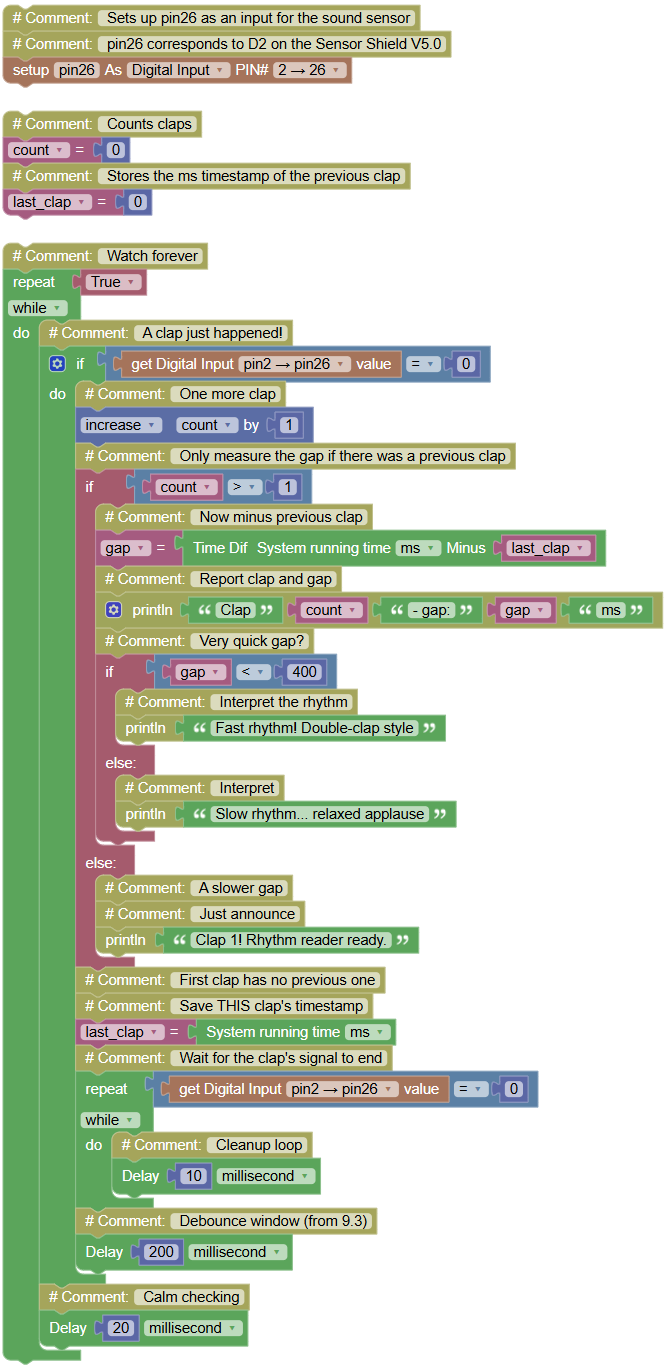
count claps AND measure the time between them discover the rhythm of your applause.
Concepts:
Event Timestamps · Gap Measurement · Pattern Recognition
import machine  # Library that controls the board's pins
import time  # Library for pauses and time

# Sets up pin26 as an input for the sound sensor
# pin26 corresponds to D2 on the Sensor Shield V5.0
pin26 = machine.Pin(26, machine.Pin.IN)

count = 0  # Counts claps
last_clap = 0  # Stores the ms timestamp of the previous clap

while True:  # Watch forever
    if pin26.value() == 0:  # A clap just happened!
        count += 1  # One more clap
        if count > 1:  # Only measure the gap if there was a previous clap
            gap = time.ticks_diff(time.ticks_ms(), last_clap)  # Now minus previous clap
            print("Clap", count, "- gap:", gap, "ms")  # Report clap and gap
            if gap < 400:  # Very quick gap?
                print("Fast rhythm! Double-clap style")  # Interpret the rhythm
            else:  # A slower gap
                print("Slow rhythm... relaxed applause")  # Interpret
        else:  # First clap has no previous one
            print("Clap 1! Rhythm reader ready.")  # Just announce
        last_clap = time.ticks_ms()  # Save THIS clap's timestamp
        while pin26.value() == 0:  # Wait for the clap's signal to end
            time.sleep_ms(10)  # Cleanup loop
        time.sleep_ms(200)  # Debounce window (from 9.3)
    time.sleep_ms(20)  # Calm checking
Serial Monitor:
Clap 1! Rhythm reader ready.
Clap 2 - gap: 1240 ms
Slow rhythm... relaxed applause
Clap 3 - gap: 280 ms
Fast rhythm! Double-clap style
💡 Note: your program now reads rhythm and rhythm is information! Clap slowly, then clap a quick double-clap: the gaps tell them apart. This is exactly how real clap-activated gadgets tell "turn on" (one clap) from "change mode" (double clap): they measure the gap and decide. You are one exercise away from building one yourself.
🎮 The Clap Command Center

Goal:
command your robot with your hands one clap activates MODE A, two quick claps activate MODE B. The robot narrates everything.
Concepts:
Clap Counting Window · Mode Selection · Command by Sound
import machine  # Library that controls the board's pins
import time  # Library for pauses and time

# Sets up pin26 as an input for the sound sensor
# pin26 corresponds to D2 on the Sensor Shield V5.0
pin26 = machine.Pin(26, machine.Pin.IN)

modeA = 0  # Counts how many times MODE A was activated
modeB = 0  # Counts how many times MODE B was activated

print("=== CLAP COMMAND CENTER ===")  # Mission title
print("1 clap = MODE A  |  2 quick claps = MODE B")  # The rules
while True:  # Listen forever
    if pin26.value() == 0:  # First clap detected!
        claps = 1  # We have one clap so far
        print("Clap 1...")  # Announce it
        while pin26.value() == 0:  # Wait for the clap's signal to end
            time.sleep_ms(10)  # Cleanup loop
        time.sleep_ms(250)  # Debounce window after the first clap
        start = time.ticks_ms()  # Open the listening window
        while time.ticks_diff(time.ticks_ms(), start) < 700:  # Listen for 700 ms
            if pin26.value() == 0:  # A second clap inside the window!
                claps += 1  # One more clap
                print("Clap", claps, "!")  # Announce it
                while pin26.value() == 0:  # Wait for its signal to end
                    time.sleep_ms(10)  # Cleanup
                start = time.ticks_ms()  # Restart the window (allow triples)
            time.sleep_ms(20)  # Checking pace
        if claps == 1:  # Just one clap total?
            modeA += 1  # Count the activation
            print(">>> MODE A activated! (", modeA, "times so far)")  # Narrate
            print("Robot: Beep! I hear you loud and clear!")  # Mode A behavior
        elif claps == 2:  # Exactly two claps?
            modeB += 1  # Count the activation
            print(">>> MODE B activated! (", modeB, "times so far)")  # Narrate
            print("Robot: Boop-beep! Secret mode engaged!")  # Mode B behavior
        else:  # Three or more claps
            print("Too many claps:", claps, "- calm down, human!")  # Funny refusal
        time.sleep_ms(500)  # Settle time before listening again
    time.sleep_ms(20)  # Calm checking between listens
Serial Monitor:
=== CLAP COMMAND CENTER ===
1 clap = MODE A | 2 quick claps = MODE B
Clap 1...
>>> MODE A activated! ( 1 times so far)
Robot: Beep! I hear you loud and clear!
Clap 1...
Clap 2 !
>>> MODE B activated! ( 1 times so far)
Robot: Boop-beep! Secret mode engaged!
Clap 1...
Clap 2 !
Clap 3 !
Too many claps: 3 - calm down, human!
💡 Note the hardest mission so far, and here is its map: the robot claps ONCE and then opens a 700 ms listening window. Any second clap inside the window changes the count; after the window closes, the total decides the mode. This "count events inside a time window" pattern is everywhere: double-clicking your mouse, tapping your phone twice to zoom, security systems counting knocks. You just built one from scratch with three ideas you already owned: edge detection, timestamps and windows. In Level 2, MODE A and MODE B will control real things lights, fans, alarms. Today, celebrate: your robot obeys sound.